
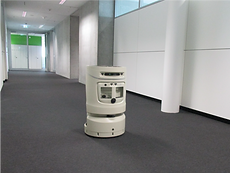
Teaching a Robot to Behave
In this case study, I outline the process and tools I used for designing the behaviour of an indoor navigation robot that would guide customers who were visiting our offices.
Background
One of the products offered by the robotics department of my organization was an autonomous indoor navigation robot that can guide visitors between locations within a building. The customers can buy this robot and customize it to suit their business cases. In order to demonstrate the indoor navigation robot to their customers, the robotics department wanted to set up an indoor guidance service that can be used within their office.
For this purpose, the department had already built the basic infrastructure and framework on how this service can be accessed and used by the customers. They wanted the design team’s help in defining how customers would experience this existing framework.

My Role
I was responsible for defining the behaviour of the robot and user research. Along with me, a visual designer, an animator, a content writer and a user researcher also worked on this project.
Understanding the Current Implementation
I started by understanding the existing infrastructure that was built by the robotics team. The current implementation required the visitors to use a kiosk at the building's reception to request this guidance service. Once the visitor keys in their destination, a robot would be released from it's charging station to guide the visitor. Using this information, I broke down the user journey of a visitor who uses this service into the following 4 stages.
.png)
Research Goal - Understanding How Professionals Do It
Following this, I started my research in order to define the behaviour of the robot during the 4 stages of this journey. For this research, my goal was to understand the etiquettes followed by people who guide visitors to their destination as a part of their profession. To learn this, I scheduled a one-on-one interview with a person who works as a secretary in the office where the robot was going to be demonstrated.
Research Method
Before the interview, I conducted a brainstorming session to identify various scenarios that may arise during the visitor’s journey. During this session, volunteers used the 4 stages as a reference point to ideate various situations that can occur at each stage. After the brainstorming session, I grouped the scenarios contributed by the volunteers into categories using a bottom-up analysis. A few examples of this can be seen below.

During the user research session, the secretary was asked to explain how they handle each scenario using the scenario sheet seen below.

Defining the Robot’s Behaviour.
After the research, I started defining the robot's behaviour for each scenario based on how the secretary said they would respond. While defining the behaviour I referred to studies on ethnography and social robotics by E.T.Hall (1966), Mumm & Mutlu (2011), Torta et al. (2011) and Brandon et al. (2014) that helped me cover the following aspects.
-
Movement: I defined the exact sequence in which the robot should accelerate/decelerate/turn for each scenario identified.
-
Time intervals: I filmed a volunteer performing the robot's response to each scenario and used the time taken by them to define the time taken for every movement. The main goal was to make sure the visitor does not feel like their time is being wasted by the robot.
-
Physical Distance: I established a guideline that the robot would never move closer than 1.5ft towards a visitor or anyone in the building. This intention was to make sure the robot is not invading the visitor's personal space but at the same time is at a distance from which the visitor can comfortably interact with the touch screen.
-
Facial Expression: I created a list of basic expressions that will be displayed depending on the scenario. This was then animated by the animator. In addition to this, blink animations were introduced at regular intervals to prevent the robot from continuously staring at the visitors and making them uncomfortable.
-
User Interface: I worked with the content writer to decide the text and controls that need to be displayed for each scenario. These texts were also based on the inputs from the secretary.
After defining these aspects for all the scenarios, I delivered the design of the behaviour in the form of a comic strip to the engineering team. After using this document to build the baseline behaviour of the robot, the engineers fine-tuned the behaviours based on user testing and feedback. The comic strip for the robot's response when the visitor stops walking can be seen below.
Results
After fine-tuning the behaviours, the robot was used to demonstrate the product to potential customers for a few months. However, the department decided to discontinue this as a product and decided to use the technology for other use cases. Even though this product did not make it to the market, working on this project was a memorable learning experience for me. It was this project that later motivated me to pursue a master's in psychology.


